Text to speech (TTS) is a technology that is able to transform written text into speech. In modern systems, text is read by an neural networks, the natural rhythm and intonation are predicted, and a natural voice is generated in milliseconds. In the present day, a lot of businesses use text to speech in their IVR menus, AI voice bots, accessibility applications, and automated phone calls. You will find out how the technology is used, how a neural engine works and how it is different from a traditional engine, which voices to use for phone calls, the importance of latency to a natural conversation, and the difference between text to speech and cloning a voice, among other things. Begin with a voice or vendor if that’s what you’re searching for.
How Does Text to Speech Work?
So, how does text-to-speech work, then? Despite the differences in the models below, every text to speech system is structured in the same way, from page to sound. But the market speaks for itself: It is estimated that the value of text to speech will be USD 4.36 billion in 2026, which will grow to USD 7.92 billion by 2031.
Text Normalization and Linguistic Analysis
The input is first precleaned. It can be used for abbreviations, dates, currencies and numbers; e.g., “Dr. = Doctor”, “Drive = depending on the context”, and “$4.5M = four point five million dollars. The next step of the linguistic analysis is the sentence structure, stress, and pronunciation, which the engine uses to identify it by using the grapheme-to-phoneme conversion, the mapping of a word’s spelling onto sounds.
Prosody Prediction and Acoustic Modeling
Prosody Prediction determines pitch, pace, and pauses. This is the difference between a robot’s and a natural reading when reading text to speech. These features are then used by an acoustic model to compress the sound into a smaller representation, typically a mel-spectrogram.
Vocoding and Audio Output
That representation is then passed to a vocoder to be transformed into a waveform you can send to a speaker or a phone line. Current voices are much better at dealing with all that emotion in the middle of a word and odd names as newer end-to-end models fold several stages into one. This pipeline is the same as the one used by any modern text to speech platform.
How Do Neural TTS vs Traditional TTS Engines Compare?
The neural TTS vs traditional TTS gap is the biggest quality jump the field has seen, so it helps to know what each approach does.
Traditional Text to Speech Engines
Traditional text to speech came in two types. Concatenative systems stitched together recorded snippets of speech. Parametric systems generated audio from statistical rules. Both were cheap and predictable, but they sounded flat, and you could hear the seams.
Neural TTS Engines
Neural TTS learns from thousands of hours of real speech and generates audio directly. It captures breath, emphasis, and rhythm that rule-based systems never could, which is why neural text to speech now leads modern voice products. One model can also produce different styles, emotions, and accents, though it costs more compute to run.
When Each Approach Still Makes Sense
Traditional engines keep a place in a few situations:
- Offline output on low-power or embedded devices
- A fixed set of short alerts or prompts
- Tight cost limits on high-volume, low-stakes audio
The neural TTS vs traditional TTS choice usually comes down to context. For anything a customer will listen to for more than a few seconds, neural is now the standard for text to speech.
What Makes Natural-Sounding AI Voice Technology Feel Human?
Clear pronunciation isn’t enough for text to speech. Natural-sounding AI voice technology earns the label because listeners tune in to human cues, and they notice quickly when something’s off.
Prosody, Pauses, and Pacing
Good text to speech voices rise and fall instead of sitting in a flat monotone. They take short breaths before commas and after a thought, and they slow down for numbers.
Emotion and Context
A calm tone suits billing. A warmer one suits a delayed order. The model also has to read context correctly, such as “read” as past or present tense, or a Spanish name inside an English sentence. Consistency counts too: the same quality on call one and call ten thousand.
Control Through SSML and Style Prompts
Modern text to speech models accept SSML tags, and some accept plain-language style prompts. A developer can slow down a card number or add weight to a deadline. Small controls like these are what make natural-sounding AI voice technology feel written for the moment instead of read off a screen.
What Are the Best Text to Speech Voices for Phone Calls?
Why Phone Audio Is Harder
Phone audio is unforgiving for any text to speech engine. Calls compress sound into a narrow band, background noise is common, and the listener has nothing visual to fall back on. A voice that wins a studio demo can fall apart on a mobile line.
Voice Traits That Work on Calls
The best text-to-speech voices for phone calls tend to share a few traits:
- Clarity at 8 kHz: tested through a real phone line, not laptop speakers
- Steady, mid-range pitch: very deep or very bright voices distort over telephony
- Moderate pace: slightly slower than casual speech, for phone numbers and order IDs
- Warm but neutral tone: overly cheerful voices wear thin on support calls
- Accent fit: a match for your callers’ region
How to Test Voices With Real Callers
Play a full two-minute script and listen for drift or odd stress. Then run a small A/B test and watch completion rates and handoffs to human agents. Those numbers tell you more than any sample clip, and they show which of the best text-to-speech voices for phone calls actually work for your audience.
Why Does TTS Latency for Real-Time Conversations Matter?
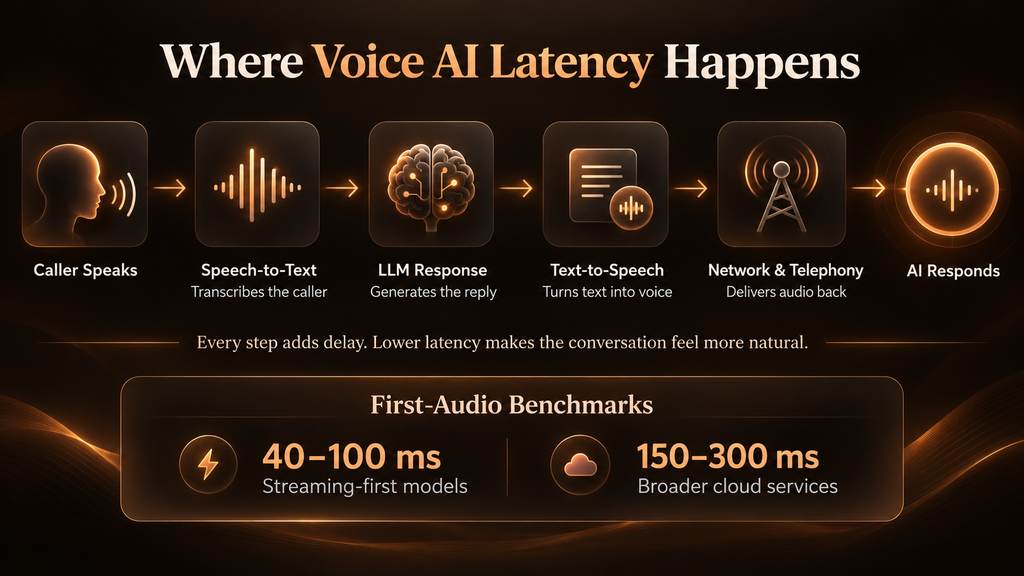
Because timing is part of meaning. In human conversation, the gap between turns is often around 200 milliseconds, and pauses much longer than that feel awkward. A voice bot that takes two seconds to answer feels broken, however good the voice sounds.
Where the Delay Comes From
TTS latency for real-time conversations is typically the time to first byte or time to first audio – the time required to get the system talking once it has text. Text to speech is just one step in the process:
- Speech-to-text: waiting for the caller to finish and transcribing
- LLM response: generating the reply
- Text to speech: producing the first audio chunk
- Network and telephony: carrying the audio back to the caller
Realistic Latency Benchmarks
Streaming-first text to speech models report first-audio times of about 40-100 milliseconds, whereas the broad cloud services fall around 150-300 milliseconds, depending on the circumstances. Don’t look at these as guidelines, but as vendor benchmarks. The outcome will vary depending on the region, load, and network operator.
Ways to Reduce Delay
- Stream audio as it’s generated instead of waiting for a full sentence
- Start speaking on the language model’s first tokens, not the finished reply
- Host services close to your telephony provider
- Test at peak volume, because a fast average with slow spikes still ruins calls
What Should a Text to Speech APIs Comparison Include?
A useful text-to-speech APIs comparison goes past price lists. Demos are easy to fall for. Production conditions are where APIs separate.
Popular APIs at a Glance
Here’s where popular text to speech APIs tend to stand out, based on current vendor and independent roundups:
| API | Known for | Consider it when |
| ElevenLabs | Expressive voices, wide language range, strong cloning | Quality and emotion matter most |
| Cartesia | Very low first-audio latency | You run real-time voice agents |
| Deepgram Aura-2 | Enterprise voice agents, on-premises option | Data control is a requirement |
| OpenAI | Simple pairing with GPT models | You already build on OpenAI |
| Azure AI Speech | Large voice catalog, custom neural voice | Global rollouts on a Microsoft stack |
| Google Cloud TTS | Broad multilingual coverage | Multilingual content on GCP |
| Amazon Polly | Deep AWS integration, SSML control | Your stack is AWS-native |
Criteria to Check Before You Commit
Whatever shortlist you build, test these points:
- Latency under load, not just in a demo
- Streaming support through WebSocket or chunked HTTP
- Language and accent coverage for your real customer base
- Pricing model, whether per character, per minute, or subscription, priced at your expected volume
- Compliance and deployment, including data residency, HIPAA needs, and on-premises options
- Pronunciation control for brand names, product codes, and numbers
Features and pricing for text to speech change quickly, so recheck vendor documentation before you sign anything.
What Are the Top TTS Use Cases in IVR and Voice Bots?
IVR is where text to speech earns its keep. Recorded prompts work until your offers, hours, or policies change. With TTS, you edit a script, and the new prompt goes live in minutes, with no studio session.
Dynamic IVR Prompts and Notifications
Live data can be read out to account balances, order status, and appointment times. Outbound reminders operate in the same way as outbound reminders: payment due dates, delivery updates, and appointment confirmations.
AI Voice Bots and Conversational Agents
With voice bots, users can ask questions and have calls directed to related services without having to navigate a menu tree. TTS use cases in IVR and AI voice agents, voice quality and latency are most crucial, as using a language model with a quick voice makes a call feel like a conversation.
Multilingual and After-Hours Support
One text to speech call flow can run in several languages without hiring voice talent for each. It also gives callers consistent answers when human agents aren’t available.
Industry Examples
These TTS use cases in IVR and voice bots repeat across industries. Healthcare teams use them for appointment reminders, banks for balance and fraud alerts, retailers for order tracking, and telecom teams for plan and outage updates. The gain comes from pairing text to speech with good call design: short prompts, an easy path to a human, and confirmation on anything sensitive.
Which Is Better: Text to Speech vs Voice Cloning?
They are related, and people do tend to confuse them. The text-to-speech vs voice cloning debate isn’t about just one or the other as cloning is a tool based on TTS.
Standard Text to Speech
Text to speech transforms any text into speech using one of the voices from a library. It can be set up in seconds and involves minimal risk, making it ideal for IVR, support bots, and notifications.
Voice Cloning
Voice cloning is the process of creating a synthetic voice of a particular individual using a recording of it and a text to speech engine then speaks the text through the synthetic voice. It works for brand voices, creators, and personal assistants, but requires samples and consent.
Consent and Compliance
Use standard voices in situations that require speed and a low level of risk. Use cloning only if a recognizable voice is a part of your brand, and only if the speaker has given his/her written consent. There is a stricter rule for synthetic voices. In the US, the FCC has determined that AI voices in robocalls are artificial voices and consent and disclosure are not optional. Regardless of whether you’re on the side of text-to-speech vs voice cloning, please review local rules before launch.
How Should You Choose the Right Text to Speech Setup?
Start from the call, not the tool. Write down what your callers need to do, how long the average exchange runs, and where a mistake would cost you the most. Then work through a simple sequence:
- Define the job. Notifications need clarity. Conversations need speed and expression.
- Shortlist three vendors from your text-to-speech APIs comparison, and run the same script through each over a real phone line.
- Measure latency and pronunciation on your own data, including names, addresses, and product codes.
- Pilot with a small share of traffic and compare results against your current flow.
- Review consent and disclosure before anything goes live.
A text to speech rollout that skips the pilot usually finds its problems in front of customers.
What Should You Take Away From This?
Text to speech was once considered to be a more robotic facility, but today it is a basic means of communication for businesses. The choice is based on a few factors: does the voice sound good over a phone line, is the TTS latency suitable for real-time conversations, and is the API compatible with your stack and compliance needs? Try it out with real callers before, and voice cloning may be a desired and mutually agreed-on aspect of a decision. The teams that master these fundamentals will have voice experiences that sound natural, respond promptly, and have the caller’s trust. Initiate steps, see what calls are actually happening, and allow for updates based on real call data.
FAQs
What is text to speech?
Text to speech (TTS) is a technology which reads text back to the user. With modern systems, it is possible to create natural voices, similar to human ones, for applications, IVR, assistants, accessibility and customer service automation.
How does text-to-speech work?
It carries out text analysis, voice and rhythm prediction and audio synthesis using a neural model and a vocoder. The resulting speech is then rendered back to the user in milliseconds after the request.
What is text to speech used for?
From providing unambiguous access to written information in healthcare, banking, retail and more, it can be used for accessibility, IVR systems, voice bots, e-learning, audiobooks, navigation and notifications.
Which is the best text to speech API?
There isn’t a correct answer. There’s ElevenLabs for expressive quality, Cartesia for low latency, cloud for Google, Azure and Amazon. Choose according to latency, language support and price.